
What is Google’s New INP Metric (And How It Impacts Your Search Rankings
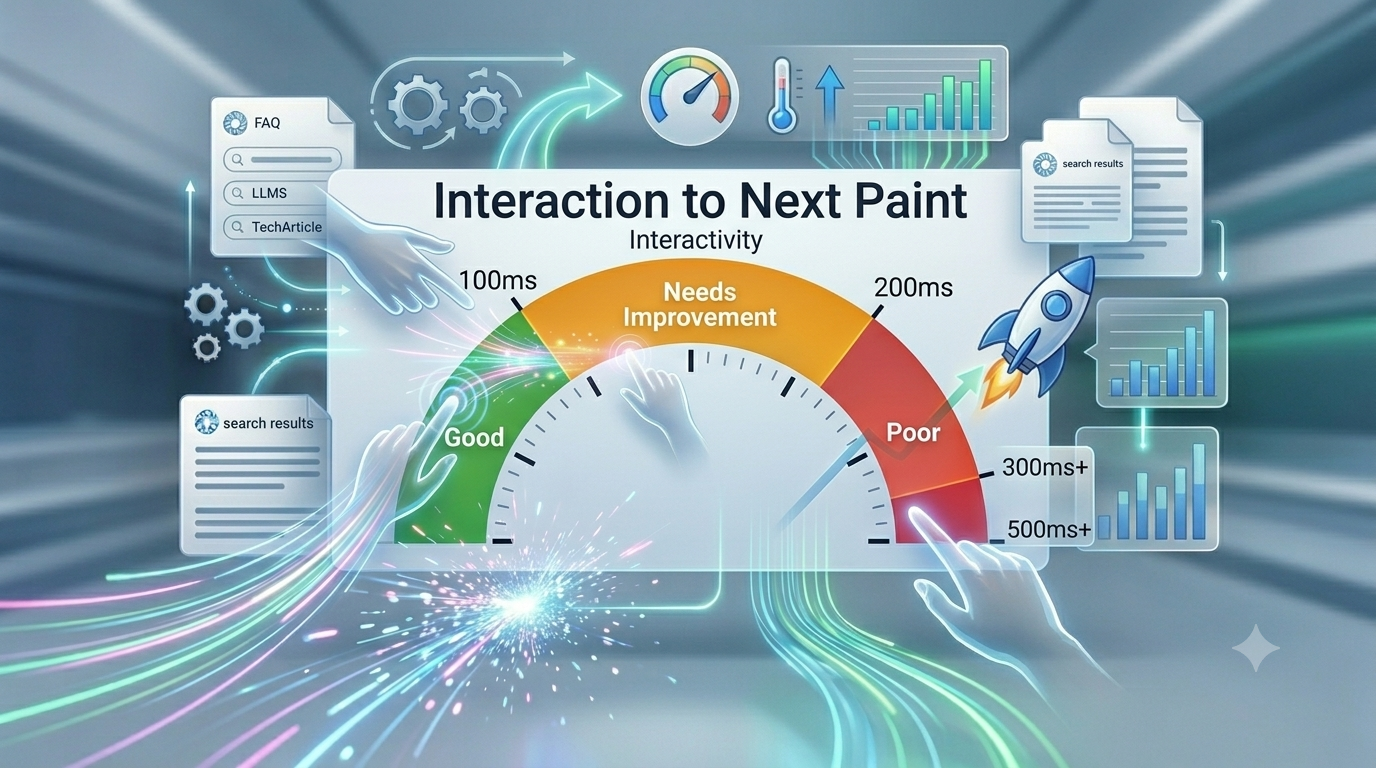
Google’s Interaction to Next Paint (INP) metric measures user interface responsiveness by tracking the latency of all user interactions across a page's lifecycle. To optimize for a "Good" INP score ($\le 200\text{ms}$), developers must break up long tasks exceeding 50ms, minimize main-thread activity by deferring non-critical JavaScript, and utilize code-splitting frameworks like Next.js to deliver immediate visual presentation feedback to users.
The core objective of search engine optimization has shifted from simple keyword placement to engineering flawless user experiences. For years, Google’s Core Web Vitals (CWV) framework evaluated visual stability and loading speeds through standard metrics. However, user frustration often peaks not during the initial load, but when interacting with a page that feels sluggish or frozen.
To address this, Google officially replaced First Input Delay (FID) with Interaction to Next Paint (INP). This transition marks a monumental shift in how modern web applications must be optimized for real-world user engagement. If your platform suffers from heavy script execution, blocking main-thread tasks, or unoptimized framework rendering, your organic visibility is at severe risk.
Traditional search engine optimization is no longer sufficient. To survive in this shifting landscape, brands must master how ChatGPT Search and Gemini SEO: How to Optimize for AI Search Engines fundamentally rewrite the rules of content visibility and indexation, where speed dictates data trust scores.
The Architecture of Latency: Deep-Dive Into INP Lifecycle
Unlike FID, which only captured the very first interaction a user had with a page, INP measures the latency of all user interactions across the entire lifecycle of a visit. It samples clicks, taps, and keyboard inputs, reporting the worst-case delay before the browser can visually update the screen (the "next paint").
An INP score is broken down into three distinct, measurable engine phases:
Input Delay
The time it takes between the user initiating a physical input (click/tap) and the moment the browser’s single-threaded event loop becomes completely free to process the specific event handler registration.
Processing Time
The precise internal clock duration required to execute the JavaScript callback code blocks associated with that user interaction inside the V8 engine.
Presentation Delay
The time the rendering engine needs to recalculate style patterns, execute layout passes, recalculate compositing layers, and physically repaint the pixels on the active hardware viewport.
To stay within Google's "Good" status bracket, your production pages must register an INP score of 200 milliseconds or less. Anything above 500 milliseconds is flagged as poor, signaling to search crawlers that the underlying codebase lacks structural efficiency. Managing your visibility in this new age requires proactive shifts. You can learn the defensive strategies to protect your traffic patterns in our article on How to Protect Your Website Traffic from Google AI Overviews.
3. Why Monolithic Stacks and Templates Destroy Your Core Web Vitals
For modern enterprises, running corporate platforms on legacy stacks presents a massive technical challenge. If you read our analysis on Why WordPress and Ready-Made Templates Are Limiting Your Enterprise SEO Growth, you already know that monolithic architectures rely heavily on third-party plugins. These plugins inject bloated, unoptimized JavaScript bundles that hijack the browser's main thread on every interactive layout component.
When a user clicks a dropdown menu, expands an accordian, or triggers a dynamic sorting function on a heavy template, the browser has to wade through megabytes of redundant code blocks before updating the user interface. This structural lag spikes your processing time metric, telling Google that your page experience is deficient.
To bypass these performance limitations entirely, high-growth enterprise brands are turning to decoupled frameworks. Shifting your frontend layer to a decoupled setup is explained in depth in our breakdown, What is Headless Architecture? The Ultimate SEO Advantage for E-commerce Platforms. By separating your presentation layer from heavy backend database queries, you gain complete granular control over how scripts are chunked, loaded, and executed.
4. Engineering a 90+ Core Web Vitals Score in React & Next.js
If you are using cutting-edge architectures like Next.js or raw React, you aren't automatically safe from high INP scores. In fact, large single-page applications often suffer from deep client-side hydration issues. When a heavy component tree dehydrates and rehydrates on a mobile screen, the main thread locks up completely, forcing massive input delays.
To combat this, your frontend engineering teams must implement strict code optimization routines that break up long tasks ($> 50\text{ms}$) into smaller, asynchronous execution windows:
JavaScript// Breaking up long technical tasks using microtask yielding
function yieldToMainThread() {
return new Promise(resolve => setTimeout(resolve, 0));
}
async function handleHeavyUserInteraction() {
// 1. Give immediate visual feedback to lower Presentation Delay
updateUIState("Processing request...");
// 2. Yield back to the browser's event loop so it can paint the feedback
await yieldToMainThread();
// 3. Run the heavy non-blocking calculation safely
executeComplexDataAnalytics();
}
By prioritizing immediate visual updates, you dramatically lower presentation delays. For a complete blueprint on setting up optimized component architectures, checking resource hints, and configuring proper server-side rendering, see our technical guide on How to Achieve a 90+ Mobile Core Web Vitals Score on React and Next.js Apps. At InnoFeature Labs, our core engineering team builds high-performance web applications designed from the ground up to clear these performance parameters effortlessly.
5. System Topography: Scaling Databases Without UI Bottlenecks
As platforms grow, performance often degrades because of unoptimized database calls and massive DOM trees. This is particularly true when executing data-heavy expansion strategies. For instance, when implementing mass landing pages as taught in our Introduction to Programmatic SEO: How to Scale Thousands of Pages via Smart Database Routing, you must ensure that your dynamic database architectures do not dump endless loops of unminified data into the DOM. Large DOM sizes significantly extend the browser’s presentation delay during an interaction.
Similarly, structural planning matters down to the pathing logic. Poorly mapped sites strain tracking scripts, analytics firewalls, and data tags, causing them to execute concurrently during simple clicks. Choosing how you expand your site affects scripts across every level, as we break down in Subdomains vs. Subfolders: Designing the Perfect URL Architecture for Enterprise Scaling.
6. Enterprise Infrastructure: Balancing Firewalls and Script Latency
When optimizing your platform for peak speed, you cannot ignore backend server responses. Heavy security systems and improperly configured Content Delivery Networks (CDNs) can add substantial latency to dynamic AJAX requests triggered by user inputs. If a user clicks a "check inventory" button and the server-side validation takes 800ms due to security inspection loops, your processing time metric plummets.
Understanding the balance between protection layers and script speed is critical. We analyze this exact dynamic in our resource on How Cyber Security Defenses and Firewalls Impact Search Engine Crawlability. If your firewall configurations or security certificates create artificial processing bottlenecks, your user experience metrics suffer across both real users and search engine bots.
Transitioning your custom database architectures, internal CRM assets, and front-facing operations to robust, serverless cloud environments (like AWS or Google Cloud) dramatically drops time-to-first-byte (TTFB) and processing latencies. If you are worried about the risks of upgrading your corporate systems, read our technical migration blueprint: Legacy ERP Migration: How to Shift to Cloud Infrastructure Without Losing Organic Rankings.
7. Conclusion & Strategic Roadmap
Optimizing for metrics like INP isn’t just about pleasing standard Google algorithms—it's about staying relevant as search behavior shifts entirely. The cleaner your page experience and the better your semantic data structures, the easier it is for modern indexing systems to value your content.
Your website must function as a rapid, secure database optimized for both human visitors and automated machine learning scrapers. By building original, information-rich content on a foundation of clean custom code, your brand establishes itself as the primary resource search engines depend on.
Ready to future-proof your digital platform against shifting search algorithms? At InnoFeature Labs, we design and build custom software systems, scalable web applications, and enterprise-grade platforms engineered to excel in the next generation of search. Book a Free Technical SEO & Architecture Audit with our infrastructure engineers today.


