

CRM implementation is the process of planning, setting up, migrating data into and rolling out a customer relationship management system so your sales, marketing and service teams actually use it every day. A typical project moves through eight steps: set goals, map your sales process, choose the CRM approach, design the data and pipeline, migrate and clean data, connect your other tools, test and train, then go live and improve.
Most CRM projects do not fail because of the software. They fail because the system was set up around a demo instead of the way the team really sells, because messy spreadsheet data was imported as it was, or because nobody owned adoption after launch. This guide walks through each step, how long it usually takes, what drives the cost, and the checklist we use before a CRM goes live.
What is CRM implementation?
CRM implementation covers everything between "we need a CRM" and "the whole team works in it". It is more than installing software. A complete implementation includes:
- Process design: agreeing lead sources, pipeline stages, ownership rules and what "qualified" means for your business.
- Configuration or development: fields, permissions, automations, dashboards and, for a custom CRM, the screens and workflows themselves.
- Data migration: moving contacts, companies, deals and history from spreadsheets or an old system, with duplicates removed.
- Integrations: website forms, email, WhatsApp, calendars, accounting or ERP.
- Training and adoption: short, role-based training and a plan for the first weeks after go-live.
Whether you choose a ready-made platform such as HubSpot, Zoho or Salesforce, or a custom CRM built around your workflow, these same building blocks apply.
CRM implementation steps: an 8-step plan
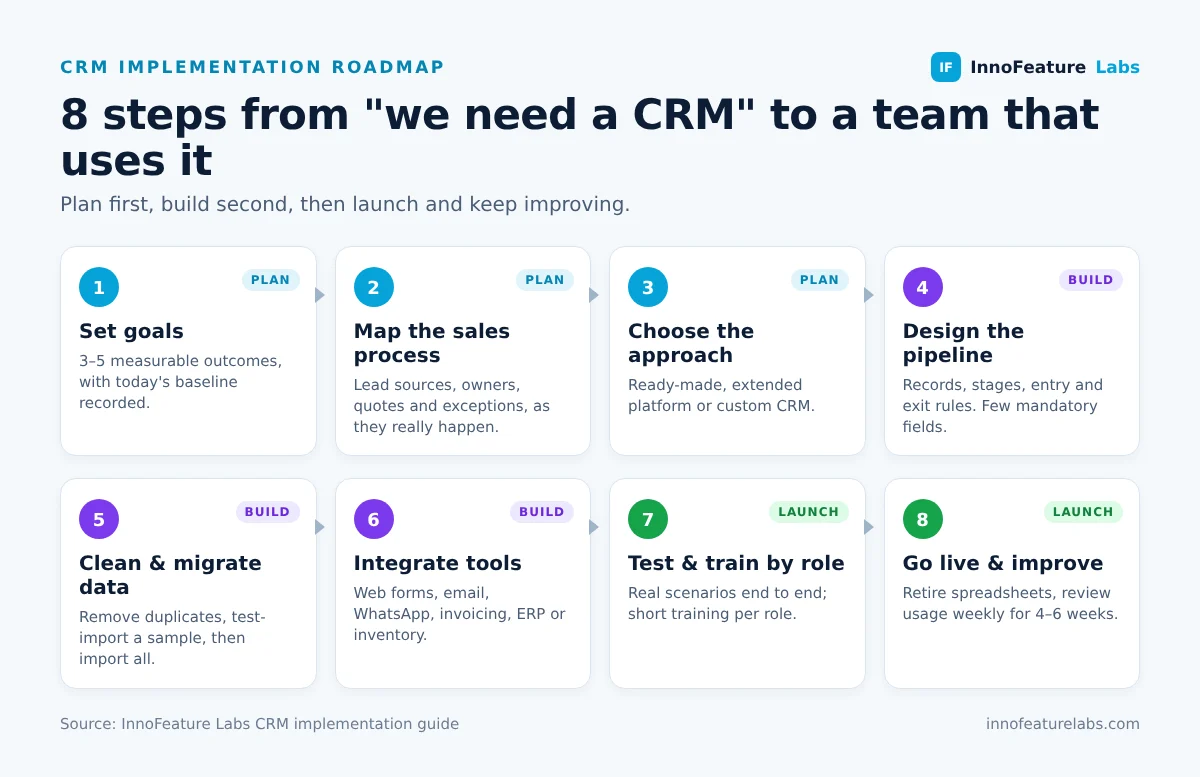
1. Define goals and success measures
Start with the business problem, not the feature list. "Respond to every new enquiry within one working hour", "stop losing follow-ups in WhatsApp" or "see the real pipeline value every Monday" are useful goals because you can check them after launch. Pick three to five measures and record today's baseline so you can compare later.
2. Map your current sales process
Sit with the people who handle enquiries and write down what really happens: where leads come from, who picks them up, which questions decide whether a lead is worth pursuing, when a quote is sent and what happens after a deal is won. Note the exceptions too, such as repeat customers, distributors or tender-based sales. This map becomes your pipeline design.
3. Choose the right CRM approach
There are three common routes:
- Ready-made CRM, configured: fastest to start when your process is close to a standard sales funnel.
- Ready-made CRM, extended: a platform plus custom fields, automations and integrations for the parts that do not fit.
- Custom CRM: built around your own workflow, permissions and reporting, with no per-user licence fees and full ownership of the system.
If you are unsure whether you need a CRM or a wider business system for stock, orders and invoicing as well, read our comparison of ERP vs CRM before you commit.
4. Design the data model and pipeline
Decide which records you need (contacts, companies, deals, activities, quotations), which fields are mandatory, and the exact pipeline stages with clear entry and exit rules. Keep the first version simple. Every extra mandatory field is one more reason for a salesperson to avoid the system.
5. Clean and migrate your data
Export everything you want to keep, then remove duplicates, fix formats (phone numbers, country names, dates) and decide what to archive instead of importing. Run a test import with a sample, check it with the sales team, and only then import the full set. If you hold personal data about customers in the UK or EU, make sure the migration follows UK GDPR and GDPR principles, including keeping only what you need.
6. Integrate the tools your team already uses
A CRM becomes valuable when information arrives automatically. Common integrations are website and landing-page forms, email and calendar, WhatsApp or call logs, quotation and invoicing tools, and an ERP or inventory system so salespeople can see stock and order status. Agree which system is the "source of truth" for each piece of data so records are not overwritten in both directions.
7. Test, then train by role
Test with real scenarios from step 2: a new web enquiry, a lead that goes cold, a deal that is won and handed to operations. Then train each role on only what they need. A salesperson needs ten minutes on logging calls and moving deals; a manager needs dashboards and reports. Short recorded walkthroughs help new starters later.
8. Go live, support adoption and improve
Choose a go-live date, stop updating the old spreadsheets on that day, and make the CRM the only place where pipeline numbers come from. For the first four to six weeks, review usage weekly, fix friction quickly and collect requests for the next phase. Automation and AI features work best once the basic data is reliable; our guide to AI agents for CRM and sales workflows shows what to add next.
How long does a CRM implementation take?
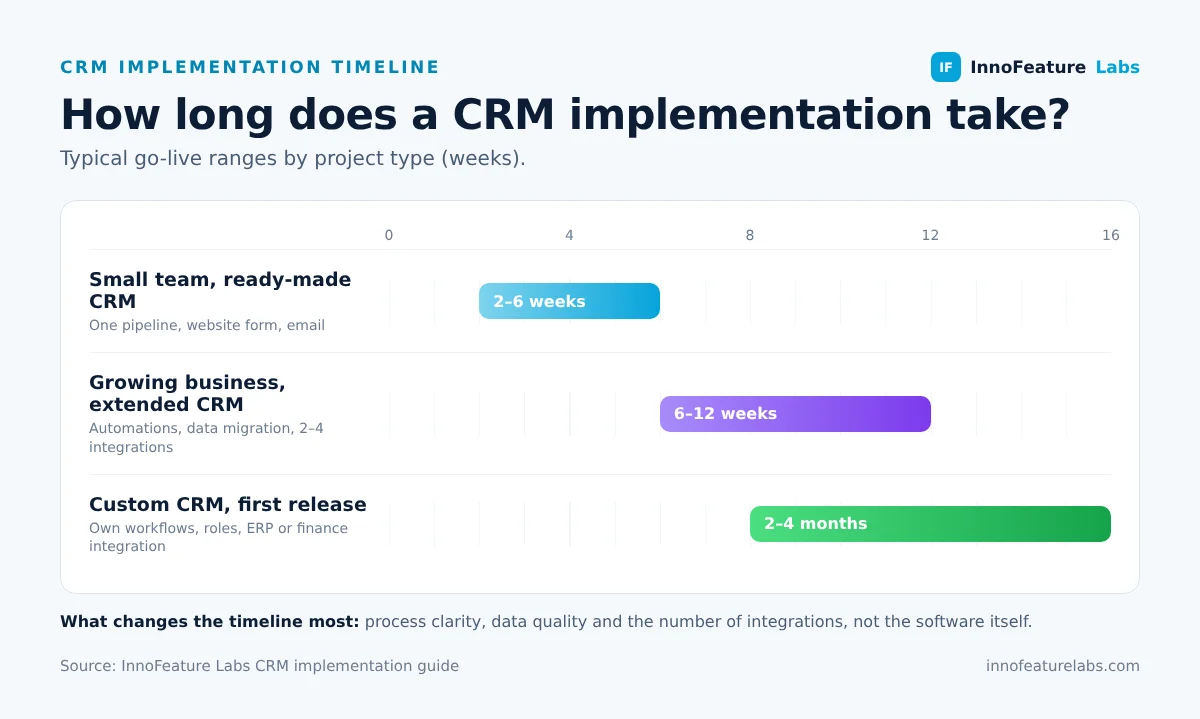
The timeline depends far more on process clarity, data quality and the number of integrations than on the software itself. As a practical guide:
| Project type | Typical scope | Typical timeline |
|---|---|---|
| Small team, ready-made CRM | One pipeline, basic fields, website form, email | 2 to 6 weeks |
| Growing business, extended CRM | Several pipelines, automations, data migration, 2 to 4 integrations | 6 to 12 weeks |
| Custom CRM | Own workflows, roles and reports, migration, ERP or finance integration | 2 to 4 months for a first release |
A phased rollout usually beats a "big bang" launch: start with the sales pipeline, then add marketing, service or operations once the first phase is used every day.
How much does CRM implementation cost?
CRM implementation cost has two parts: the software (subscription, licence or development) and the implementation work around it. The main cost drivers are:
- Number of users and per-user pricing: licence fees on many platforms grow with every seat.
- Process complexity: multiple pipelines, approval rules and custom roles take longer to design and test.
- Data migration: clean data is quick to move; years of duplicated spreadsheets are not.
- Integrations: each connection to accounting, ERP, telephony or messaging adds build and testing time.
- Training and support: ongoing help after go-live protects your investment.
For reference, InnoFeature Labs' ready-made sales CRM starts from £49 per month or £1,499 as a one-time purchase, with multiple users included and no per-user fees; customisation is quoted separately. See our pricing, or the detailed breakdown in how much a custom CRM costs in the UK.
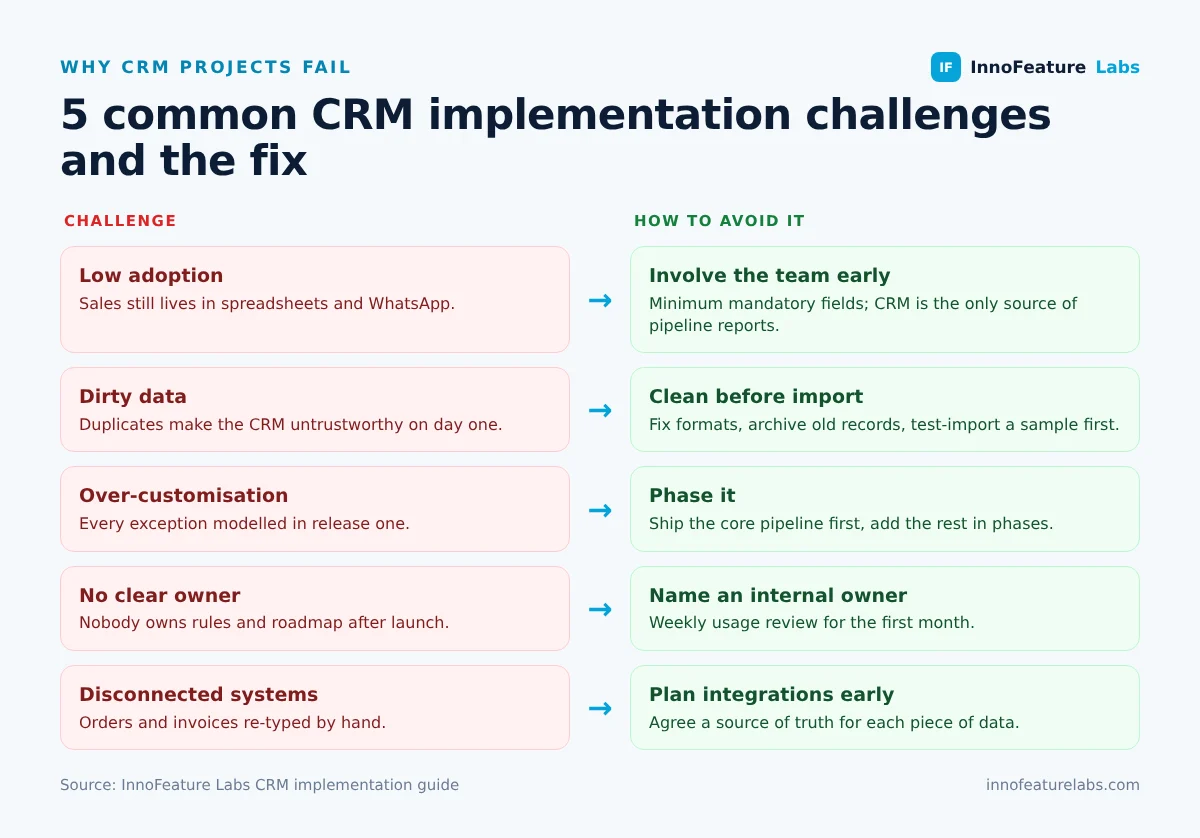
Common CRM implementation challenges (and how to avoid them)
- Low adoption: salespeople keep using spreadsheets or WhatsApp. Involve them in step 2, keep mandatory fields to a minimum and make the CRM the only source of pipeline reports.
- Dirty data: duplicates and incomplete records make the CRM untrustworthy on day one. Clean before you import, not after.
- Over-customisation: trying to model every exception in the first release delays launch. Ship the core pipeline first and add the rest in phases.
- No clear owner: someone inside the business must own the CRM, its rules and its roadmap after the implementation partner steps back.
- Disconnected systems: if orders, stock and invoices live elsewhere, sales teams end up re-typing data. Plan the key integrations from the start, even if they go live in phase two.
CRM implementation checklist
Use this checklist before you switch the CRM on for the whole team:
- Goals and three to five success measures agreed, with a baseline recorded
- Sales process mapped, including exceptions
- Pipeline stages defined with clear entry and exit rules
- Mandatory fields kept to the minimum
- Roles and permissions set up and tested
- Data cleaned, test import checked, full import complete
- Website forms, email and other key integrations working
- Real-life scenarios tested end to end
- Role-based training delivered and recorded
- Go-live date set and old spreadsheets retired
- Internal CRM owner named and weekly review booked for the first month
Do you need a CRM implementation partner?
A small team with a simple sales process can often set up a ready-made CRM itself. A partner becomes worth it when you need data migration from several sources, integrations with accounting or ERP, custom workflows or permissions, or when a previous CRM attempt did not stick. A good partner starts with your process, not a software demo, and stays involved after go-live.
InnoFeature Labs provides CRM implementation services for businesses in the UK, UAE, USA and Germany: setup and configuration, data migration, integrations and training, for our own sales CRM, a custom build or a platform you already use. You can see the kind of results a well-implemented CRM delivers in our AI CRM automation case study.
Conclusion
A successful CRM implementation is a business project, not just a software install. Set measurable goals, design the CRM around how your team really sells, clean your data before migrating it, connect the tools your team already relies on, and support adoption after launch. Do those things and the CRM becomes the place where your pipeline lives, not another system people avoid.
Planning a CRM implementation or rescuing one that did not work? Book a free consultation and we will review your sales process and recommend the most practical route.


